Amazon Follow-Up Emails: The New Rules for Sellers (2026)
Riley Bennett
Connect with Riley →
Published
· Updated

Not sure what's holding your listing back?
Get a free, expert review of your Amazon listing with clear fixes for images, copy and conversion.
Get a FREE Listing Audit
Yes, you can still send follow-up emails to Amazon buyers, but only when the message is needed to complete the order, or to ask for a review once. Amazon’s Buyer-Seller Messaging rules ban thank-you notes, marketing, coupons and repeat review requests. Here’s what’s allowed, what isn’t, and how to stay compliant.
As of Q4 2020, Amazon has changed the rules for sending follow-up messages/emails to customers. Basically, they are much more strict now with what you can say.
It makes sense from Amazon’s point of view – they just don’t want their users to be spammed with tons of seller emails. They basically want sellers to contact customers ONLY if it is absolutely needed! So in short, you gotta keep it short and sweet.
What is this? Amazon calls it Buyer-Seller ‘Messaging’, but it goes to the customer’s email inbox. They will not see your email address, but they can hit reply to start a thread. You need to reply to all emails/messages within 24 hours. You can do this either inside Seller Central in the Messages section or by replying to the email that goes to your account email address.
OK, let’s get into what you can and cannot do.
What you can send: allowed message reasons
Resolving an issue with order fulfillment
Requesting additional information required to complete the order
Asking a return-related question
Sending an invoice
Requesting product review and/or seller feedback
Scheduling the delivery of a heavy or bulky item
Scheduling a Home Services appointment
Verifying a custom design
Any other reason where the contact is required for the buyer to receive their purchase.
Messages must be sent within 30 days of order completion.
Notice it says you still CAN ask for a review. But only ONCE, and it must not be only ‘if they liked it’ or in exchange for something.
What you can’t send: banned message types
Order or shipping confirmations (See indirect communication below)
Messages that say only “Thank you” or that you are here to help if buyers have any problems
Translation: no more ‘thanks for your order, this is Riley the CEO here if you need anything…’ emails!
Marketing or promotional messaging, including coupons
Language that either incentivizes or persuades the buyer to submit positive product reviews or seller feedback, including by offering compensation, money, gift cards, free or discounted products, refunds, rebates or reimbursements, or future-benefits
Language that requests removal or an update of an existing product review
Language that requests a product review only if they have had a positive experience with the product
Translation: you can’t say ‘if you enjoy the product consider leaving a review’.
A repeat request (per order) for a product review or seller feedback
Translation: you can only ask for a review ONCE!
What messages must not include
External links unless they are secure working links (https, not http) necessary for order completion or links to Amazon
Attachments except for product instructions, warranty information, or invoices
Logos, if they contain or display a link to your website
Link to opt-out of messaging
Sensitive content in images or text (e.g. bare skin, violence/gore, adult/offensive language)
Tracking pixels or images
Email addresses or telephone numbers
Images of purchased products as Amazon includes those on your behalf
Images that do not relate to your brand or company
Formatting rules for buyer messages
Accessibility issues as specified in the Web Content Accessibility Guidelines from the Web Accessibility
InitiativeEmojis
GIFs
Message margins over 20% max width
Image or graphic sizes larger than 80% max width
Overrides of Amazon’s default line height, font family, or font color
Fonts in more than three sizes
Message bodies that are centered or that otherwise override default text alignment settings
More than two line-breaks (spacing between paragraphs) in a row
Unsecure images (http instead of https)
Spelling errors or grammar issues
Ok, that’s pretty much all the details from Amazon’s original announcement.
Strategy & best practices
Basically, we just gotta keep it simple now. This is how I set up my email drip:
Day 1: I included the instructions in text format.
You can also optionally attach it as a PDF
You can ask for Seller Feedback in this email if you want. This is recommended if you have a new seller account.
Something like: ‘Dear Amazon customer, here are the instructions for your order: ____. Riley Bennett, Founder, Amazing Marketing Co.’
Optional: ‘PS. Did everything arrive OK? Kindly leave Seller Feedback to let us know how your order experience went – it is much appreciated.’
Day 25: a simple review ask.
Something like: ‘It’s been a few weeks since your order, so I kindly wanted to invite you to leave a product review on Amazon – it is very important to us. Thank you!’
Tip: you can hyperlink to http://amazon.com/ryp to take the customer to the Review Your Purchases page (they permit links to Amazon). This comes in handy if you sell multiple products.
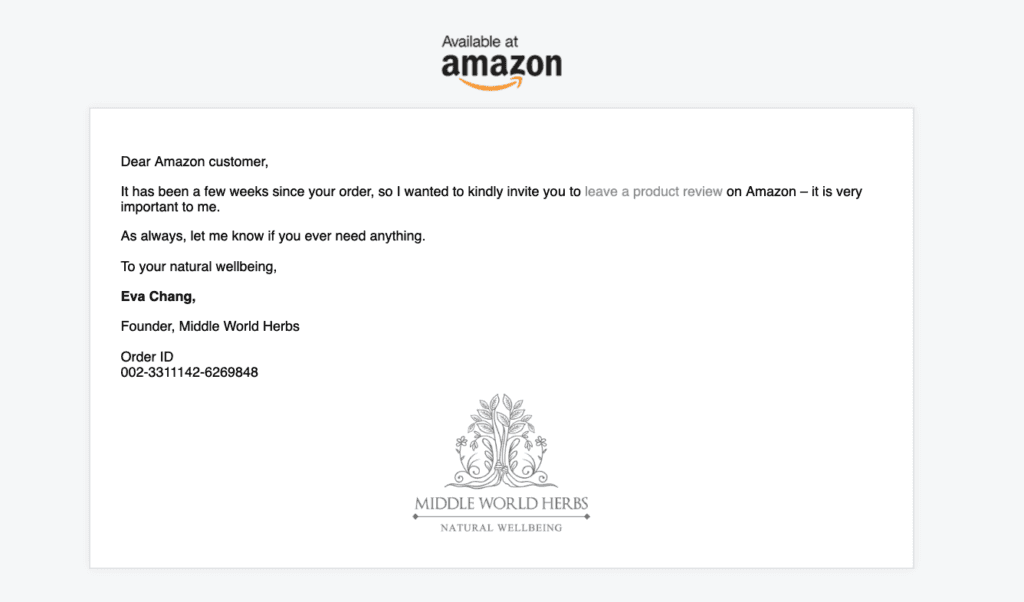
For getting reviews, Amazon has now set up a new system where sellers can click a ‘Request Review’ button next to each order ID inside of SC. Luckily, Jungle Scout has recently released a tool that automates this! So watch this video on how to turn on Jungle Scout Review Automation and turn it on now!
https://youtu.be/Cg8yF2HU5Ys
How to set up review automation using Jungle Scout (an all-in-one seller dashboard that I recommend to all sellers – here is a discount link).
Takeaway
The big picture here is Amazon is moving away from buyer-seller messaging to protect its shoppers from receiving too many emails. However, sellers can still send 1 simple review request email, and attach instructions if needed.
Personally, I don’t think its that big of a deal, because the primary purpose of these emails for most sellers was to get more reviews – and now Amazon has the new Request Review feature, which you can automate by turning on Jungle Scout Review Automation.
Wondering how to get your first 10 reviews for your new listing? Read this article: Amazon Launch: How I Get My First 10 Reviews FAST (2020 Updated)
Let's Grow Your Brand
Frequently asked questions
Can I ask for a review in an Amazon follow-up email?
Yes, but only once per order, and the request has to stay neutral. Lines like “if you enjoy the product, leave a review” aren't allowed.
When do I have to send it?
Within 30 days of order completion. Reply to buyer messages within 24 hours.
Can I include links, logos or coupons?
No coupons or marketing. Links only if they're secure (https) and needed for the order, and logos can't link to your website.